Zorofin / iPad
A bigger view.
Your own library.
Zorofin is a native Jellyfin client for iPad. Explore your movies and shows with room for artwork, title details and a vertical episode list, using the same Jellyfin account as your other devices.
Coming to iPhone and iPad. Version 1.0 is submitted to Apple and awaiting review. Invited testers can continue using TestFlight. Release availability.
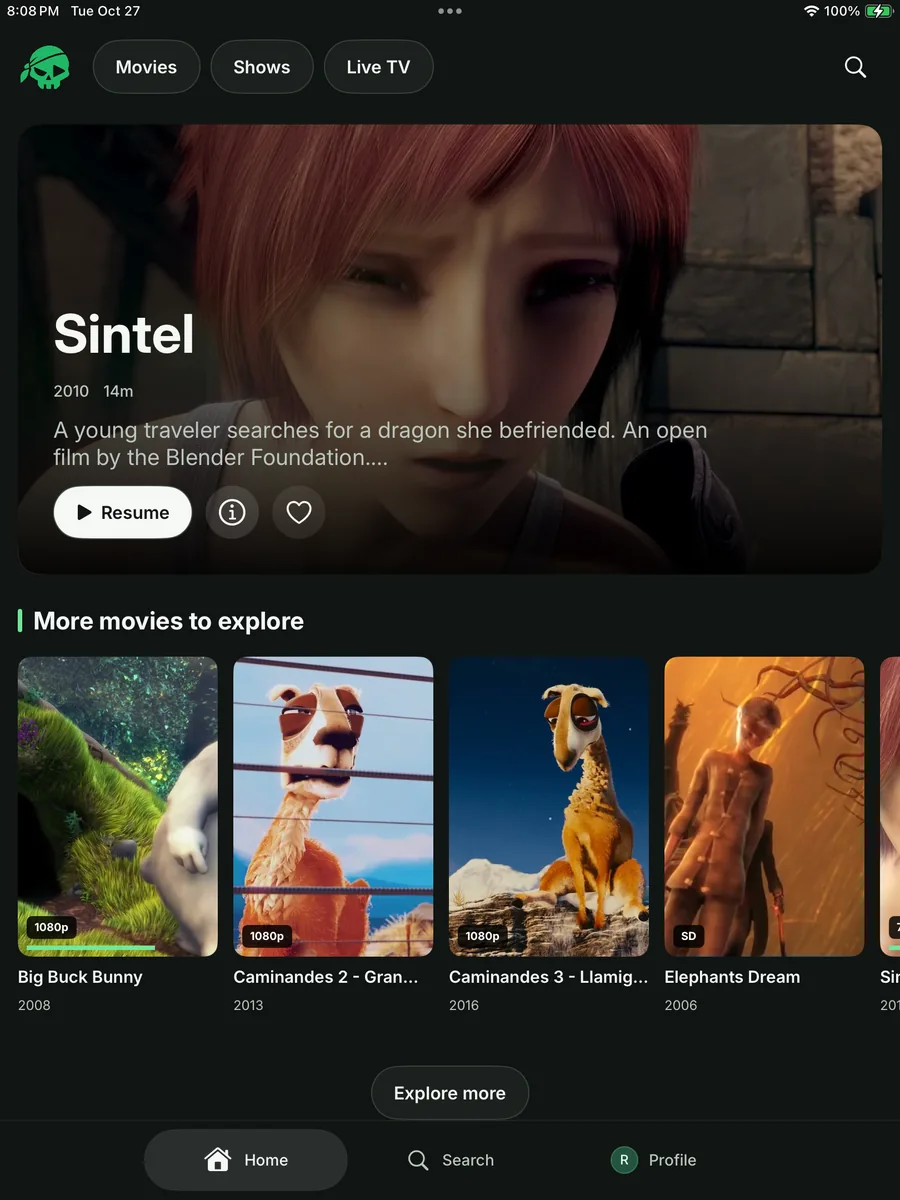
What can I do on iPad?
Browse the server’s movie and show libraries, search for titles, open details and choose a season or episode. The iPad interface shares Zorofin’s visual language with iPhone while giving the library more space.
Watch state comes from Jellyfin, so progress depends on using the same server and account. Available audio, subtitles and playback formats depend on your media and server.
Will it run on an older iPad?
The app requires iPadOS 18 or later. Physical sign-in and browsing were checked on an iPad 7th generation running iPadOS 18.7.9. Media playback compatibility depends on the device, file and server configuration.
Do I need a special server setup?
No Zorofin backend or plugin is needed for core Jellyfin browsing and playback. You need the server address and an existing account with permission to access its library. Optional Requests and server-support features depend on the connected server.
Can I use the same account on iPhone and Apple TV?
Zorofin supports saved server/account selection, and your Jellyfin server owns the library and viewing state. Each device signs in to that server. Your server operator may set session limits or different permissions for each account.
Read about the iPhone app and the Apple TV app, or compare the platform requirements.